macOS 版本暂无实机调试,请按包内说明安装尝试。因苹果系统安全限制,步骤可能较复杂,感谢理解~macOS has limited device testing for now. Please follow the included guide; installation may be more complex due to macOS security rules.
♡免费分享 · 请勿用于商业用途Free to enjoy · No commercial use
✦
定制你的专属 ShimejiCreate your own Shimeji
把喜欢的角色、小宠物,甚至你自己,变成会在桌面上陪伴你的 Shimeji。Turn a favorite character, a beloved pet, or even yourself into a Shimeji that keeps you company on your desktop.
✓可定制 OC、偶像、IP 角色、原创形象OCs, idols, IP characters and original designs
✓可将自家小宠物制作成桌面陪伴Turn your own pet into a desktop companion
✓也可以把自己设计成可爱的桌面分身Create a cute desktop avatar of yourself
✓根据需求提供定制动作制作Custom animations designed around your needs
More wallpapers from previous projects may be added. Stay tuned!
壁纸大图预览Wallpaper preview
✦
使用教程Quick guide
01下载并完整解压Download & unzip请用解压软件将 zip 压缩包解压到任意位置 (建议不要直接解压在 C 盘中)。Use an unzip tool to extract the ZIP package anywhere. Avoid extracting it directly to the C drive.
02Windows:直接双击 EXE 文件启动Windows: double-click the EXE file to launch
(如果完全没反应请点击下方按钮重新下载 Java 8) Mac:运行安装包内应用;安全验证请点下方按钮查看。
If nothing happens, use the Java 8 button below. Mac: Run the app inside the installer. Use the button below for security steps.
03与 Shimeji 互动Interact with Shimeji可以拖动、点击桌宠; 右键桌宠打开互动选项,右键托盘图标可打开菜单。Drag or click a pet. Right-click it for interaction options, or right-click the tray icon to open the menu.
04进阶操作Advanced controls控制分裂和操作“可互动窗口”请点击下方视频观看:For split controls and the interactive-window feature, watch the video below.
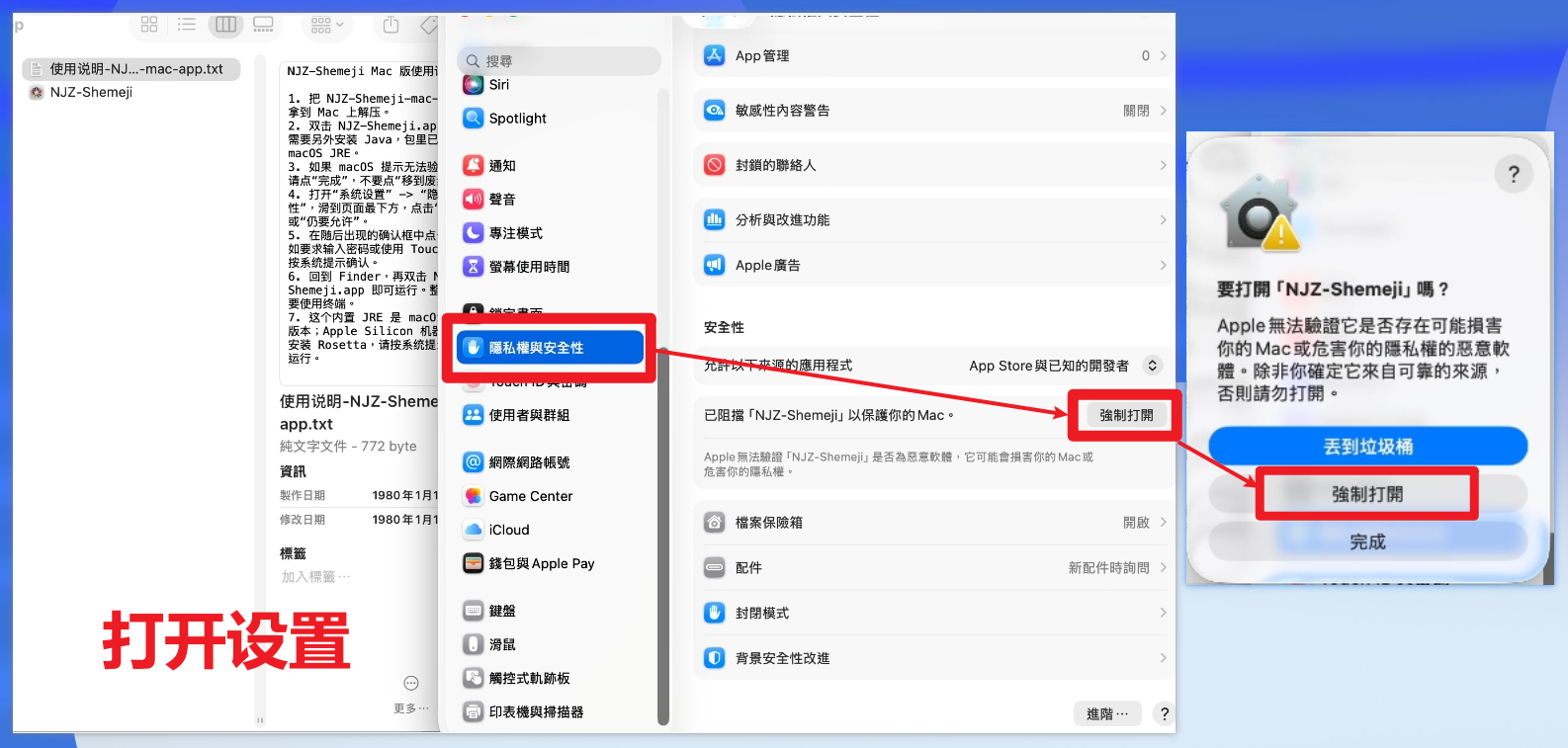
Mac版本安全验证操作macOS security verification
双击 NJZ-Shemeji.app 运行。Double-click NJZ-Shemeji.app to launch it.
如果 macOS 提示无法验证开发者,请点“完成”,不要点“移到废纸篓”。If macOS cannot verify the developer, choose “Done” — do not choose “Move to Bin”.
打开“系统设置” → “隐私与安全性”,滑到页面最下方,点击“仍要打开”或“仍要允许”。Open System Settings → Privacy & Security. Scroll to the bottom and choose “Open Anyway” or “Allow Anyway”.
在随后出现的确认框中点击“打开”;如要求输入密码或使用 Touch ID,请按系统提示确认。In the confirmation dialog, choose “Open”. Enter your password or use Touch ID if macOS asks.
回到 Finder,再双击 NJZ-Shemeji.app 即可运行。Return to Finder and double-click NJZ-Shemeji.app again to run it.
Shimeji was created by Yuki Yamada of Group Finity. Shimeji-ee was enhanced by Kilkakon and community contributors, incorporating related work including TigerHix.
开源许可Open-source licenses
Shimeji-ee 主体以 New BSD 条款发布;i18n 类包含 John O'Conner 的 MIT 许可代码;JNA、NimROD 等组件适用其 LGPL 条款,并另有 zlib/libpng 许可内容。
Shimeji-ee is distributed under New BSD terms. Its i18n classes include MIT-licensed code by John O'Conner; JNA and NimROD components are covered by LGPL terms, alongside zlib/libpng notices.
NJZ names, likenesses and trademarks belong to their respective owners. This non-commercial fan project is not officially affiliated with the artists, companies or rights holders.
想定制专属Shimeji,或者在使用过程遇到问题?或者任何需求,欢迎通过邮箱联系我~Want a custom Shimeji, need help while using it, or have another request? You’re always welcome to contact me by email!